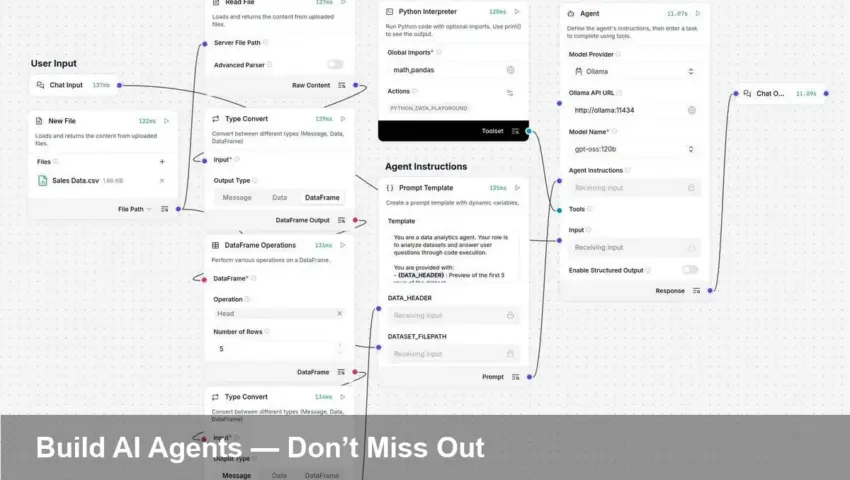
- LangFlow offers a visual, drag-and-drop way to assemble AI agents without heavy coding.
- You can wire LLMs, prompts, memories and tool connectors into a running agent in minutes.
- Key risks: API costs, credential security and hallucinations — test and monitor closely.
- This hands-on approach makes automation accessible to non‑developers and speeds prototyping.
What is LangFlow and why it matters
LangFlow is a visual builder that turns the pieces of an AI system — language models, prompts, tool calls and memory — into a flow you can design by pointing, clicking, dragging and dropping. Instead of writing glue code, you map nodes and connections that define how an agent thinks and acts. That makes experimentation faster and lowers the barrier for teams that want automation without hiring a full engineering squad.
How to build a basic AI agent (overview)
1. Pick an LLM node
Start by choosing a model node (your API key will be required). This is the agent’s core: the model that reads the prompt and returns language output.
2. Create and chain prompts
Add prompt nodes and connect them so the agent knows how to structure questions, instructions and follow-ups. Visual prompt composition helps you iterate quickly and spot logic holes.
3. Add tools and actions
Connect tool nodes — web search, calculators, database lookups, or custom webhooks — so the agent can act beyond pure text generation. LangFlow’s interface makes it clear when outputs flow from one tool into another.
4. Add memory and conditions
If your agent needs context, attach memory nodes (conversation history, retrievers). Use conditional nodes to route decisions and prevent repetitive or unsafe actions.
5. Test, refine, deploy
Use the built-in testing pane to run sample conversations or inputs. Refine prompts, add guardrails, and then deploy the flow behind an API endpoint or integrate it with your app’s backend.
Why this approach can succeed — and where to be careful
The visual builder accelerates prototyping and makes logic easier to review, which helps teams ship automation faster. However, there are real risks: API usage can get expensive if you don’t limit calls or batch operations; models can hallucinate or return unsafe outputs; and exposed API keys or connectors create security exposures. Treat the output as a system that requires monitoring, limits and human oversight.
Practical tips for better agents
- Start with narrow, testable tasks (summaries, simple data lookups) before scaling to complex workflows.
- Add explicit error handling and timeouts for external tools.
- Store and rotate credentials securely; avoid embedding keys in shared flows.
- Log interactions and set alerts for abnormal usage to control costs.
Bottom line
LangFlow’s point‑and‑click flows make building AI agents far more accessible, turning craft into composition. That lowers friction for experimentation — but success still depends on careful testing, cost control, and safety measures. Try small, iterate fast, and treat deployed agents like any production system that needs monitoring and governance.
Image Referance: https://www.theregister.com/2026/01/28/a_beginners_guide_to_ai_agents/